Module @trevixal/editor-kit
@trevixal/editor-kit




Documentation · Live editor · Changelog · Issues
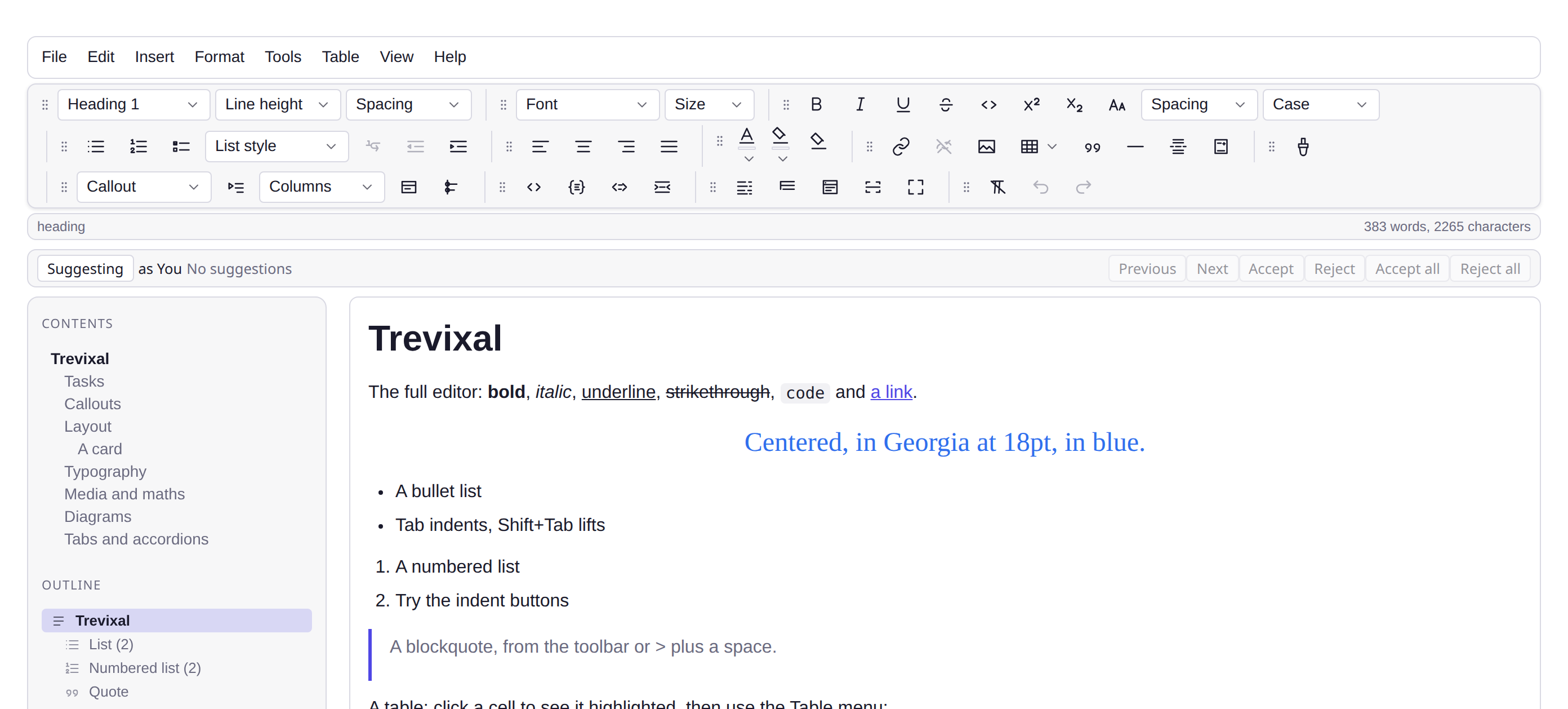
Features
- One call mounts the finished editor:
mountFullEditor({ element }) - Every extension wired to every other: tables, images, math, diagrams, track changes
- Autosave, themes, a document workspace and a command palette included
- A CDN build that runs from one
<script>tag with no bundler - 14.1 kB minified and gzipped, with TypeScript types in the package
Every package the Trevixal workspace ships, assembled into
one call. Where @trevixal/core is the engine and @trevixal/ui is the
chrome, this is the finished editor. The thing the demo page was, with the
page taken out of it.
npm install @trevixal/editor-kit @trevixal/core @trevixal/ui
import { mountFullEditor } from '@trevixal/editor-kit'
import '@trevixal/ui/styles.css'
import '@trevixal/editor-kit/styles.css'
const editor = mountFullEditor({ element: document.querySelector('#app') })
That is the whole integration. Everything below is optional.
What you get
One call builds the page and wires every part of it to every other:
| Chrome | Menubar, toolbar with draggable groups, status bar, dialogs, command palette (Ctrl+K) |
| Blocks | Headings, lists, task lists, quotes, code, tables, images, callouts, toggles, tabs, accordions, columns, cards, timelines, badges, buttons, anchors, footnotes, citations |
| Media | Image upload with resize and crop, attachments, video, audio, YouTube, Vimeo, link cards |
| Maths and diagrams | LaTeX equations, Mermaid diagrams fetched on first use |
| Writing | Grammar, passive voice, repeated words and long sentences, each switchable; readability, keyword density, word goals |
| Review | Track changes with a suggestion bar, edit history |
| Files | Open and save HTML, Markdown, text, JSON, Word; print and print preview |
| Storage | Autosave to localStorage with rolling backups and draft recovery, a document workspace with tabs and folders |
| Security | AES-256-GCM password protection over everything it saves, .tvx encrypted files with expiry, copy/cut/paste/print/download restrictions |
| Presentation | Six themes plus a custom one, custom CSS, web fonts, page view, focus mode, typewriter mode, fullscreen, side-by-side preview, a second live editing surface |
| Input | Slash commands, :emoji: shortcodes, rebindable shortcuts, find and replace |
Configuration
Only what a host actually decides. Which extensions, which menus, which panels. Those are not options, because a build with half of them is not what this package is for.
mountFullEditor({
element, // required; it is emptied first
content: myDocument, // default: a tour of every block type
placeholder: 'Write something…',
author: 'Ada', // whose name goes on a tracked change
namespace: 'my-app', // the localStorage prefix for everything it saves
uploadEndpoint: '/api/uploads', // or null to skip the request and use a data URL
maxImageBytes: 5 * 1024 * 1024,
heading: 'My editor', // or null for none
paragraphs: ['<b>Some</b> copy.'],
showSerializedHTML: false,
aboutRows: [{ term: 'Build', description: 'v2.1' }],
onChange: (editor) => save(editor.getJSON()),
})
The returned handle carries the editor, the layout it built, the ui it
mounted, and a destroy() that takes all three back.
Where it can run
It reaches for window and document in its first statement, so it has to be
called from wherever your framework runs browser-only code (a useEffect, an
onMounted, an afterNextRender, an onMount) and never during a server
render. The examples do exactly that in eight frameworks;
each one is a few lines long.
Call it once per page. Several of the parts it assembles are singletons by
nature (the autosave draft, the workspace store, the command palette on
document.body) so a second mount sharing a namespace would have two editors
writing over one another's saves.
On a server
mountFullEditor is browser-only. The package is not: importing it runs no
DOM code, so a Node process can take the schema out of it and render a stored
document to HTML with no browser anywhere.
import { createEditor, serializeToHTML } from '@trevixal/core'
import { createFullSchema } from '@trevixal/editor-kit'
const editor = createEditor({ schema: createFullSchema(), content: stored }) // no element
const html = serializeToHTML(editor.state.doc)
editor.destroy()
createFullSchema() is the schema mountFullEditor builds on, tables,
images, blocks, embeds, equations and the track-changes marks. defaultNodes()
alone cannot read a document this editor produced.
examples/ssr is the runnable version.
From a script tag, with no bundler
There is a second build for pages that have none: one file that defines
window.TrevixalKit, with the core, the chrome and every extension inlined
because such a page cannot fetch them separately.
<link rel="stylesheet" href="https://unpkg.com/@trevixal/ui/styles.css" />
<link rel="stylesheet" href="https://unpkg.com/@trevixal/editor-kit/styles.css" />
<script src="https://unpkg.com/@trevixal/editor-kit"></script>
<div id="app"></div>
<script>
TrevixalKit.mountFullEditor({ element: document.querySelector('#app') })
</script>
It is the largest artefact this workspace publishes, 180 kB gzipped
against 36 kB for the core alone, and that is the trade it exists to make. If
you have a bundler, import the package instead and let it tree-shake; if you
need an editor in a page you cannot build, this is the whole integration.
examples/vanilla-cdn runs it, and is four tags
and a div long.
Styles
Two stylesheets, in this order:
import '@trevixal/ui/styles.css' // the editor and its chrome
import '@trevixal/editor-kit/styles.css' // the shell around them
The second is scoped to .trevixal-full-editor, the class the mount puts on
your element, so it does not reach into the rest of your page. The one
deliberate exception is the syntax-colour palette: collectDocumentCSS copies
those rules into exported and previewed documents, which have none of the
shell around them, so they cannot be scoped to it.
The SCSS sources ship too, at @trevixal/editor-kit/scss/*, if you would
rather build the palette from your own tokens.
Building it yourself instead
Nothing here is privileged. mountFullEditor is a few hundred lines that
import the same public API you have, and src/mount.ts is
worth reading if you want most of this editor but not all of it: copy it,
delete what you do not want, and you have your own build with no fork of
anything.
License
Apache-2.0